7 SAP Integration Mistakes That Stall Projects — And How Experienced Teams Avoid Every One
Last Updated : 13/08/2026
Estimated : 14 min read
Author : Lokesh A
Table of Content
- Introduction
- What Is at Stake When SAP Integration Goes Wrong
- Mistake 1: Skipping Master Data Alignment Before Writing a Single iFlow
- Mistake 2: Choosing the Wrong Middleware
- Mistake 3: No Error Handling Strategy (Silent Integration Failures)
- Mistake 4: Going Live Without a Dual-System Run Period
- Mistake 5: Ignoring API Version Management and SAP Update Cycles
- Mistake 6: Scope Creep in Phase 2 Without Change Control
- Mistake 7: Underinvesting in User Training and Change Management
- How VeeTee Approaches SAP Integration Projects
- Conclusion
- Book a free SAP integration scoping call
- Frequently Asked Questions (FAQ)
Introduction
SAP integration projects have a notoriously high failure rate — not because the technology is broken, but because the same set of avoidable mistakes surface in project after project. Whether your organisation is integrating SAP S/4HANA with Salesforce, connecting SAP to a legacy ERP, or building integration flows in SAP Integration Suite (formerly Cloud Platform Integration / CPI), the failure modes are consistent enough to predict.Veetee's SAP Integration Suitehas managed enterprise integration projects across India, UAE, UK, and Canada for over 17 years — the seven mistakes documented here come from real project postmortems, not theoretical risk lists.
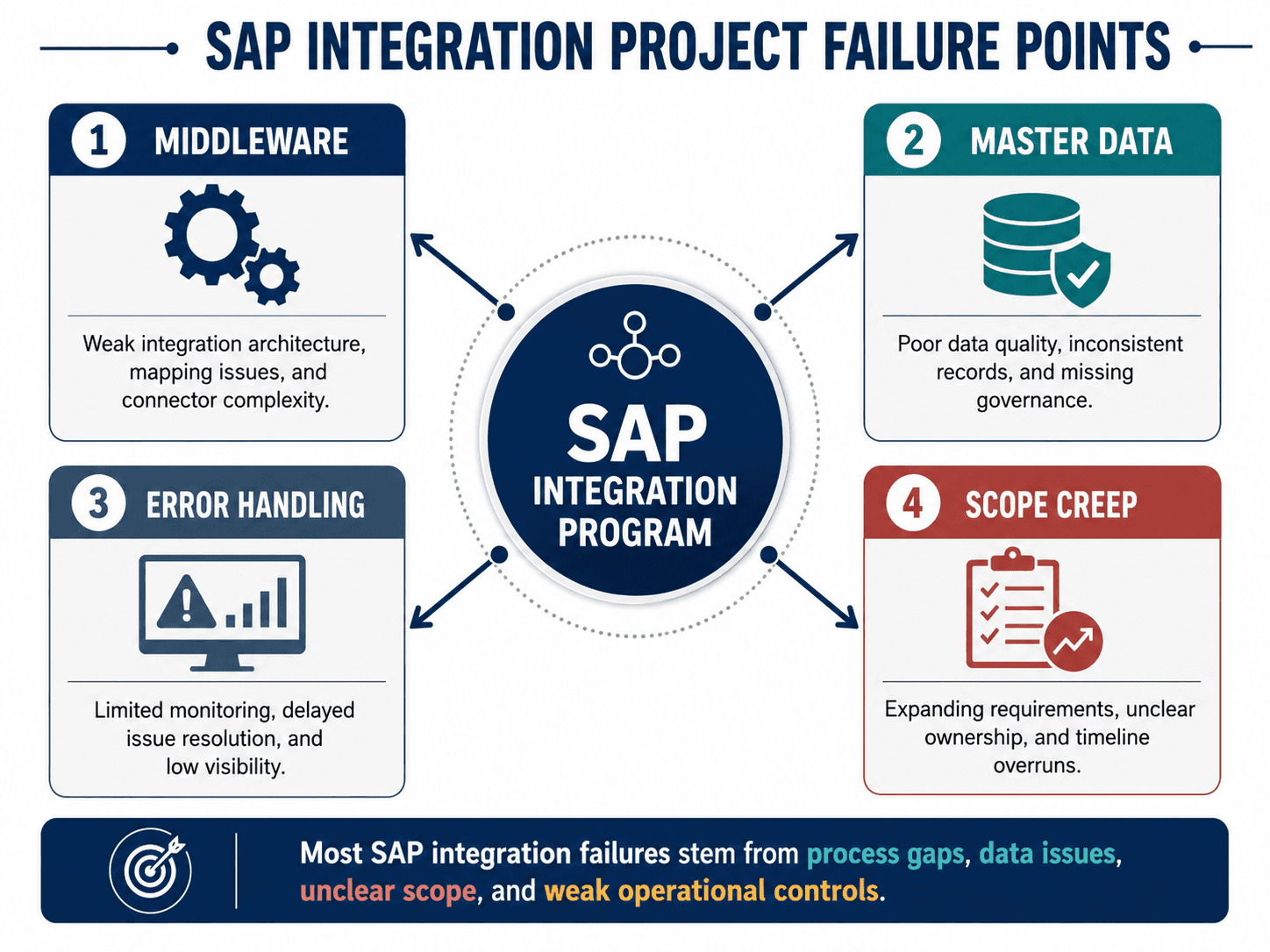 SAP integration project failure points: master data, middleware, error handling, scope creep
What Is at Stake When SAP Integration Goes Wrong
A failed integration is not just a technical problem — it is a business problem. Aptimized's 2026 SAP S/4HANA guide documents the pattern: incorrect data propagates across the enterprise — customer orders not reaching the warehouse, invoices not syncing to the financial ledger, HR records not updating in payroll. Remediation is typically three to five times more expensive than prevention, and the reputational cost with internal stakeholders can set an integration programme back by six months or more.
Mistake 1: Skipping Master Data Alignment Before Writing a Single iFlow
This is the most predictable failure in SAP integration projects. Integration flows connect two systems. But if customer IDs, material codes, vendor numbers, or cost centres do not match between systems, every message that crosses the integration boundary either fails or creates a duplicate. A common scenario: SAP sends a customer record with ID 'CUST-001', Salesforce expects '1001'. Every order created in SAP fails to sync — quietly, without any obvious error on the business user's screen.
The fix: conduct a full master data audit across both systems before development begins. Agree on canonical IDs, create explicit mapping tables that cover exceptions and edge cases, and implement a data quality check at the source. If your organisation has more than three source systems, consider a dedicated MDM layer — SAP Data Services or a third-party tool — rather than handling all mapping logic inside individual iFlows.
Mistake 2: Choosing the Wrong Middleware
Two opposite errors: point-to-point direct API connections (which create a maintenance nightmare at scale — n*(n-1)/2 connections for n systems, no central monitoring) and over-engineering by selecting SAP Integration Suite for every scenario including simple two-system connections that would be better served by a direct REST API. Cremencing's SAP Integration Suite vs CPI analysis documents a common mistake: teams conflate SAP CPI with the full Integration Suite and miss capabilities — or, conversely, use the full suite where a simpler tool would suffice. The right decision: map each integration scenario against complexity, volume, and governance requirements before selecting middleware.
Mistake 3: No Error Handling Strategy (Silent Integration Failures)
The most dangerous failure mode: an iFlow fails silently — a network timeout, an authentication expiry, a schema mismatch — and the message is dropped without an alert. Business users continue working, unaware that a data gap is opening. ERPVits' advanced CPI integration guide outlines the required architecture: error categorisation (technical, functional, transient), JMS queues for reliable message persistence, dead-letter queues for unprocessable messages, circuit-breaker patterns to prevent cascade failures, and alert rules based on business criticality rather than raw error counts.
Mistake 4: Going Live Without a Dual-System Run Period
Integration projects are under timeline pressure universally. One of the most tempting shortcuts is to skip the parallel-run phase — running both the old manual process and the new integration simultaneously for two to four weeks, comparing outputs daily. The rationale is always 'we tested thoroughly in QA.' The consequence: production reveals data conditions that QA did not cover, and the team is simultaneously fixing bugs and explaining discrepancies to business stakeholders who have lost confidence. Two weeks of parallel running, with daily reconciliation and a defined discrepancy tolerance threshold, is the minimum for any SAP integration touching financial or operational data.
Mistake 5: Ignoring API Version Management and SAP Update Cycles
SAP releases updates to its APIs on a regular cadence. Third-party systems — Salesforce, ServiceNow, Workday — also update frequently. An integration built against API v1.0 can break silently when either system deprecates an endpoint. The fix: subscribe to SAP deprecation notices through SAP API Business Hub; version-lock your API calls where the target system supports versioned endpoints; and build daily integration smoke tests against real API endpoints — not just unit tests in CI/CD. When an API change is coming, you need six months of warning, not a Monday-morning incident alert
Mistake 6: Scope Creep in Phase 2 Without Change Control
Phase 1 goes live successfully. Business users immediately request fifteen more connections. Without formal change control, the integration team enters a perpetual Phase 2 that never ends, technical debt accumulates, and the original architecture becomes unmaintainable. Every integration addition should be treated as a new project: scoped, estimated, prioritised, and formally approved before development begins. Expertia's SAP CPI project guide identifies 'improperly managing change' as one of the top causes of SAP CPI project failures — documenting how teams that skip change management end up with fragmented integration landscapes that are expensive to troubleshoot and impossible to hand over.
Mistake 7: Underinvesting in User Training and Change Management
The most technically excellent integration can fail from a business perspective if the people who work with the connected systems do not understand what has changed. We have seen integration projects where data flows perfectly — and business users in both systems continue to update records manually 'because they don't trust the sync.' The double-keying creates exactly the data inconsistencies the integration was supposed to eliminate.
Budget for change management explicitly — industry benchmarks suggest 10–15% of total project cost. The training programme must cover three specific areas: what the integration does and what it replaces; what users no longer need to do manually; and what to do when something looks wrong — an escalation path, not a generic IT helpdesk number.
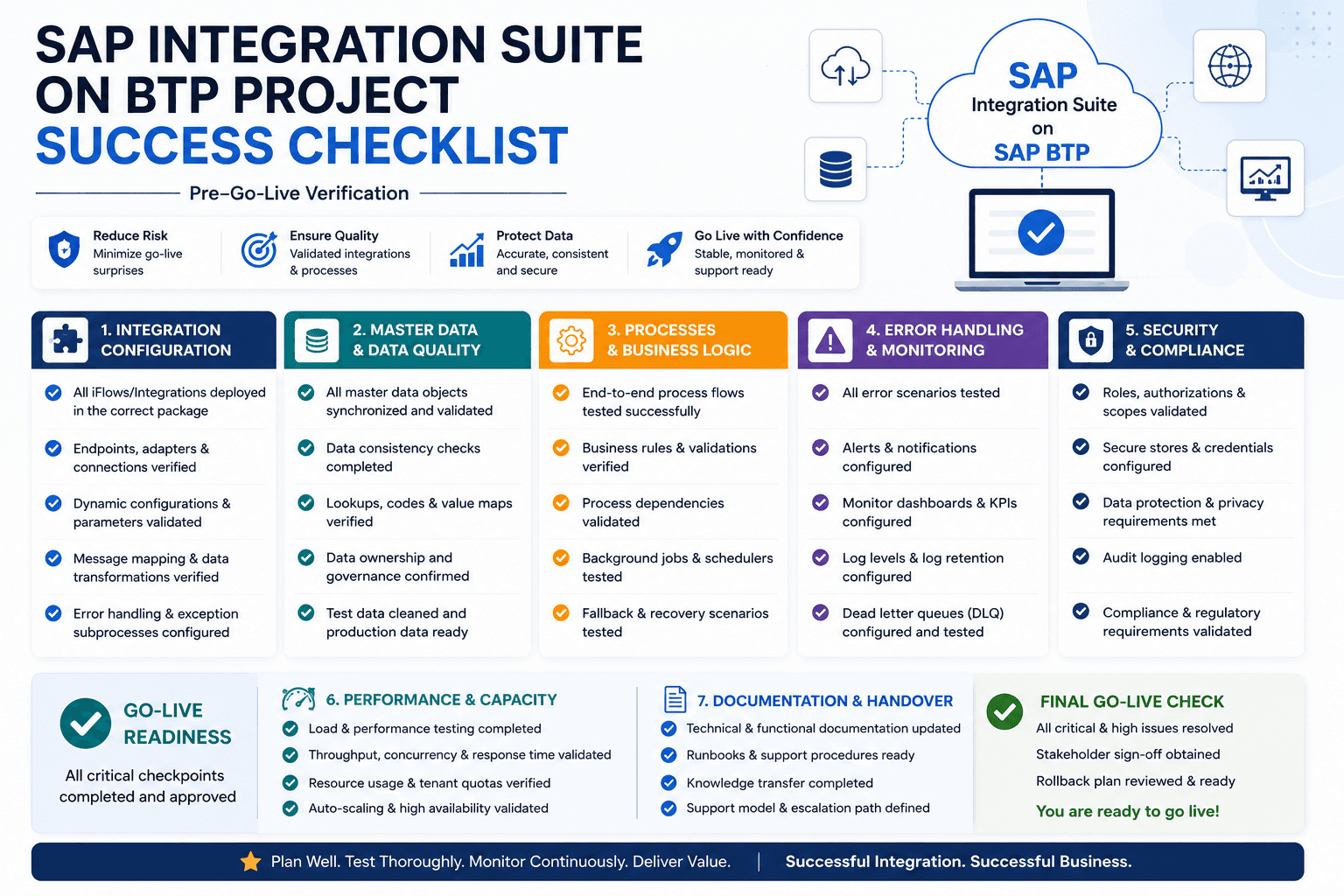 SAP Integration Suite project success checklist — pre-go-live verification steps
How VeeTee Approaches SAP Integration Projects
VeeTee Technologies has deliveredSAP integration projectsaddresses each of these seven failure modes explicitly in our project methodology: master data validation before iFlow development, middleware selection based on integration pattern rather than default preference, mandatory error handling design reviews, and parallel-run governance as a non-negotiable pre-go-live gate. We connect SAP to Salesforce, ServiceNow, Microsoft Dynamics, Oracle, and custom applications for enterprises across India, UAE, UK, and Canada.
Conclusion
None of these seven mistakes is exotic, and none is a technology problem. They are sequencing and governance problems: work done in the wrong order, decisions left undocumented, and controls added after the incident that would have prevented it. Sequence master data before iFlows, error handling before QA, and parallel run before cutover — and the technical integration becomes the straightforward part of the project.
Book a free SAP integration scoping call
Whether you are scoping a new integration or trying to stabilise one that is already struggling, a short review with an experienced team will surface the risks that matter most for your landscape.Contact our SAP integration teamto book yours — no commitment required.
Frequently Asked Questions (FAQ)
SAP Cloud Platform Integration (CPI) is one capability within the larger SAP Integration Suite, which also includes API Management, Event Mesh, Integration Advisor, and Open Connectors. Cremencing's analysis documents the most common mistake: 'Conflating CPI with the full Integration Suite misses powerful capabilities.' Teams discover they need API Management or Event Mesh only after kick-off, when they are already committed to a license scope that does not include them.
A single bi-directional SAP-to-Salesforce integration (accounts, contacts, orders) takes 8–14 weeks from scoping to production go-live including parallel run. A full SAP S/4HANA integration programme with 15–25 scenarios typically runs 9–18 months. The most common cause of timeline overrun is underestimated master data work — budget at least 20–30% of development time for data alignment before iFlow build starts.
For SAP-to-SAP or SAP-as-primary integrations, SAP Integration Suite's native adapters (IDoc, BAPI, RFC, OData) are maintained by SAP and require no custom connector development — making it the default recommendation. For enterprises where SAP is one of many systems and the platform needs to be genuinely agnostic (Salesforce, Workday, Oracle, Microsoft 365), MuleSoft's broader connector library and mature API lifecycle management may be the better choice. The answer is almost never 'both' — two competing integration platforms doubles governance overhead. VeeTee's team provides neutral middleware selection guidance as part of our scoping process.
Synchronous integration sends a message and waits for an immediate response before continuing — suitable where the calling system needs a real-time answer, for example a customer-facing order confirmation or a credit check. Asynchronous integration sends a message and does not wait: the sender continues working while the message is processed independently, which suits batch-style transfers, one-way notifications, and high-volume scenarios where response time matters less than throughput. Most enterprise integration architectures use a mix of both, with asynchronous patterns preferred for high-volume flows where slight processing delay is acceptable.
SAP Integration Suite's built-in Operations Dashboard provides message processing logs, status tracking, and error detail per iFlow execution. Supplement this with: custom alert rules based on business-critical failure thresholds; integration with your ITSM platform (ServiceNow, PagerDuty) for incident routing; and dead-letter queue monitoring to ensure failed messages are reviewed and reprocessed. ERPVits' integration patterns guide recommends categorising errors as technical, functional, or transient at design time and configuring monitoring rules accordingly.
The best starting integration is high frequency, low complexity, and unambiguous in its success criteria. Customer master data synchronisation between SAP and your CRM (Salesforce, Dynamics, or similar) is typically the first recommendation — every business needs it, the data structures are well-understood, and the success metric (master data match rate between systems) is easily measured. Get this integration right before layering on order management, financial posting, or logistics integrations that have higher stakes for data errors.
Get in Touch
Contact Us
+91 9500945700
adm@vttech.in
No: 8/65, 1st Floor, Radhakrishnan Street, Shankaran Avenue, Velachery, Chennai, Tamil Nadu – 600042, India.
We’re here to help you !